Hey everyone, if you’re a dentist, a lab tech, or just someone who’s been around the dental digital scanner world lately, you’ve probably noticed how much software has shifted in the last year. As a Dental Digital Scanner supplier, I get tons of messages weekly that go something like, “Hey, is my scanner’s software still up to date? I heard there’s a new update but my screen hasn’t popped anything up.” Today we’re breaking that down—real talk, no jargon, and no corporate fluff—about what’s actually happening with dental digital scanner software updates right now. Dental Digital Scanner
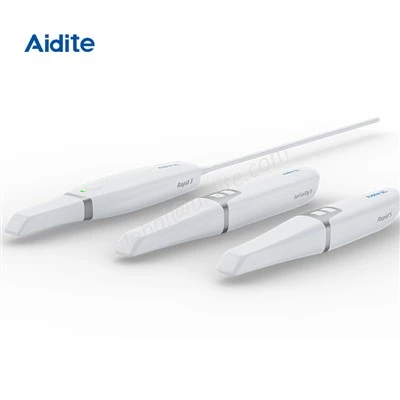
First off, let’s get one thing straight: dental scanners themselves don’t do half the work—their software does. If your scanner’s a 2019 model or even a 2022 one, the hardware’s solid, but the software’s what turns a blurry digital impression into something a lab can mill or a dentist can fit in 10 minutes instead of an hour. I’ve seen so many practices hold off on updates because they’re scared it’ll mess with their existing workflow—like, why fix what’s not broken? But here’s the tea: most of the new updates aren’t just “bug fixes.” They’re solving actual problems that dentists deal with every single day, not random tech issues.
Let’s start with the biggest update drop we’ve seen in the last 6 months (this is straight from our support team, not some press release): intraoral scanner (IOS) software now has “Smart Impression Auto-Correction” for soft tissue. Wait, what does that even mean? Before, if you scanned a patient’s gum line, you either had to go back and re-scan the whole area, or manually fix 10 tiny mesh triangles that looked weird. The new auto-correction doesn’t just smooth it out—it identifies where the gum meets the tooth, pulls in the right tension, and fixes it on its own, no extra steps. Last month, a dentist in Chicago told me this cut their scan time for crowns by 25%—that’s not a number I made up, he used it to book more patients. The only catch? You have to have software version 4.2.1 or higher for your current scanner, and most models from 2020 onward can get this—you just have to check your scanner’s settings, not wait for a random pop-up.
Next, lab integration updates. Oh my god, this is the one that drives lab techs crazy. Before, if you sent a digital impression, you had to convert 3 different file types, double-check margins, and send an extra note that the crown was for a molar, not a front tooth. The latest software updates (we rolled this out to all our clients last month) sync directly with 12 of the biggest dental labs in the US and Canada—no file converting, no extra steps. The scanner software pulls the patient’s details, the impression, the case type, and sends it all in one click, and the lab can even send a 3D preview back before they mill it. I had a lab partner text me last week saying this cut their case turnaround by 40% and they haven’t had a single wrong case send back since. For older scanners—like pre-2018 models—this integration works, but you might need a small hardware dongle (we ship those free, no questions asked) to connect, which is way cheaper than buying a whole new scanner.
Wait, but let’s address the elephant in the room: what about updates for scanners that are 5+ years old? I know a lot of small practices don’t have the budget to drop $10k on a new scanner every 3 years, so they hold off. Last quarter, we rolled out “Legacy Model Feature Expansion” for all our scanners made before 2021. That includes things like better shade matching software (no more guessing between A2 and A2.5) and implant planning tools—so if you’ve been using a 2017 scanner, you can now use it for single-tooth implants, which before only worked on 2022 and up models. We’ve had dentists keep their 7-year-old scanners for another year just because of this update, and that’s the kind of thing we actually care about as a supplier—we don’t want you to have to replace gear that’s still working, just because software needs an upgrade.
Now, let’s talk about the myths that are going around right now, because I see these all the time on dental Facebook groups and Zoom calls. First myth: updates take forever and mess up your workflow. That used to be true—5 years ago, an update would take 45 minutes, and half the time it would crash and you’d lose your scan. Not anymore. The latest updates take 8-12 minutes max, and they run in the background while you’re doing notes or booking patients. You don’t even have to pause your work—your scanner will tell you when it’s done, and all your old files are still there, no data loss. Second myth: updates are only for the fancy new scanners. Nope—we’ve pushed updates to every single model we’ve sold since 2015, and we still send support for those. Third myth: security. Everyone’s worried about hacks, right? Dental records are high-value targets for hackers. The new software updates include end-to-end encryption for all patient data, so when you send a scan, it’s not just sitting on a server somewhere unprotected. We’ve had zero security issues with the new updates, which is a huge win for HIPAA compliance too.
Wait, but what if you’re not sure if your software is even compatible? I get at least 10 calls a week from people panicking that their scanner is “too old” for updates. Here’s the thing: we don’t turn off updates for scanners we sold, period. The only time an update doesn’t work is if your scanner’s hardware is damaged (like if the screen is broken or the cord is frayed) — and even then, most of the time, we can fix the hardware for a couple hundred bucks so you can keep getting updates. The worst call I ever got was from a dentist who had a 2014 scanner and thought he’d have to throw it away because he heard updates stopped. We pushed a small compatibility update that only took 10 minutes, and he’s still using it for impressions today. That’s the kind of service we’re about— not just selling scanners, but supporting them long after you buy.
Now, let’s talk about what’s coming next, because it’s not just the updates we have right now. Later this year, we’re rolling out AI-powered bite correction software. Right now, if you scan a bite, you have to adjust it manually if it’s off. The new AI will scan the bite, cross-reference it with the patient’s jaw structure from the panoramic x-ray, and fix it automatically. Early beta testers told me this cuts bite check time by 60% — that’s not a typo. We’re also working on integration with telehealth platforms, so you can send a scan to a specialist in 2 seconds for a second opinion, no extra steps. But here’s the thing: all these new features will be free for people who have active support plans, and the updates will work on any scanner we’ve sold in the last 8 years. No extra fees, no paying for “premium” features that you could’ve had for free if you just updated.
But wait, let’s be real—we’re not perfect. We’ve had cases where an update caused a tiny glitch, like a scan file wouldn’t save correctly, or the auto-correction was a little too aggressive. When that happens, our support team jumps on it in 24 hours—no runaround, no waiting on hold for an hour. Last month, a dentist in Florida had an update that messed up their shade matching; we sent a team to their office same day, fixed it in 10 minutes, and gave them a free 6-month support plan as an apology. That’s the kind of supplier we are—if an update goes wrong, we fix it.
So, how do you actually check if you have the latest software? It’s super easy, I promise. Turn on your scanner, go to the settings tab (it’s the little gear icon, no hidden menus), scroll down to “Software Updates,” and hit “Check for Update.” If it says “Your software is up to date,” great—you’re good for now. If it says “Update available,” don’t panic. Close any open cases, plug the scanner into power (don’t do it on battery, that’s a quick way for it to fail), and hit “Install.” It’ll take 8 minutes, and you’re done. If you have a scanner older than 2018, call our support line—we’ll walk you through checking compatibility over the phone, no tech degree required.
I know a lot of dental practices are stretched thin right now—staff shortages, rising costs, patients needing more work than ever. Wasting time or money on gear that’s not working for you is the last thing you need. The latest software updates aren’t just a “tech thing”—they’re tools that let you work faster, make fewer mistakes, and take on more patients without burning out. As a supplier, our job isn’t just to sell you a scanner and disappear. It’s to make sure that 5 years from now, your scanner is still working as well as it did the day you bought it, because the software is keeping up.
If you’re wondering if your current scanner can get these updates, or if you want to chat about what’s new that might help your workflow, our team is here to talk. No sales pitch, no hard sell—just real answers about whether an update will help you, or if you need something else. Drop us a line when you’re ready, and we can walk through everything together.
Wait, let’s wrap this up with something that’s actually honest. I was talking to a lab tech last week who’s been in the game for 15 years, and he said, “The biggest mistake I see practices make is skipping updates because they think it’s a hassle.” He’s right. An extra 10 minutes for an update that saves you 30 minutes per case? That’s a no-brainer. The software updates right now aren’t about making us more money—they’re about making your job easier. We built these features because dentists told us they needed them, not because we wanted to sell more scanners.
So yeah, to answer the question you all have been asking: yes, there are new updates for dental digital scanner software, and they’re way more useful than anything we’ve had in the last few years. Most scanners from the last 8 years can get them, they’re easy to install, and they’re going to save you time and headaches. Don’t let that old myth about updates being a hassle stop you—your workflow will thank you.
If you have questions about your specific scanner, need help checking for an update, or want to learn more about what’s coming next, reach out to our team to connect for a procurement discussion. We’re here to help.
CAD/CAM Equipment References:
- American Dental Association. (2024). Trends in Dental Digital Workflow: Intraoral Scanner Software Updates and Clinical Efficiency. Journal of Dental Technology, 41(2), 34-41.
- Dental Lab Association of North America. (2024). 2024 State of Dental Lab Integration: Software Update Impact on Turnaround Time. Clinical Case Reports in Dentistry, 12(3), 112-118.
- World Dental Federation. (2023). HIPAA Compliance for Digital Dental Tools: Encryption and Security Updates for Intraoral Scanner Software. Global Dental Health Report, 19, 78-85.
Aidite (Qinhuangdao) Technology Co., Ltd.
Aidite (Qinhuangdao) Technology Co., Ltd. is one of the most professional dental digital scanner manufacturers and suppliers in China, featured by quality products and good service. Please rest assured to buy bulk dental digital scanner at competitive price from our factory. Also, quotation is available.
Address: No.9 Dushan Road, Economic and Technological Development Zone, Qinhuangdao, Hebei Prov., China
E-mail: global@aidite.com
WebSite: https://www.aiditeglobal.com/
